
Menu

Availability: Low stock: 6 left
Couldn't load pickup availability


Application: Desktop, Laptop
Axis Body Brand: OUTEMU
Backlight Type: MULTICOLOR
Battery Included: No
Brand Name: MACHENIKE
Choice: Yes
Full-size keyboard: No
High-concern chemical: None
Interface Type: USB
Keyboard Standard: 63 Keys
Keycap material: ABS plastic
Keycap printing: Double-shot
Language: BRAZILIAN
MACHENIKE Model: K500-B61
Operation Style: Mechanical
Origin: Mainland China
Package: Yes
Style: Standard
Hot-Swappable Switches: Yes
Type: Wired
Wrist Support: No
• Mini Mechanical Keyboard:The Machenike K500-B61 is a compact 60% mini mechanical keyboard, perfect for gamers who value space and portability.
• 63-Key Standard:With its 63-key standard, this keyboard offers all the essential keys for a seamless gaming experience.
• ABS Plastic Keycap Material:The ABS plastic keycap material ensures durability and long-lasting performance, giving you a reliable gaming companion.
• Multicolor Backlighting:The keyboard features vibrant multicolor backlighting, allowing you to customize your gaming environment to your preferences.
• Hot-swappable NKRO:The hot-swappable NKRO feature lets you change mechanical switches without disassembling the entire keyboard.
• Wired Connection:The wired connection ensures stable, fast data transmission, enhancing your gaming performance.
【 K500-B61 Mini 60% size】
【 K500 Series Mini ABNT2 edition 】
SPECIFICATIONS
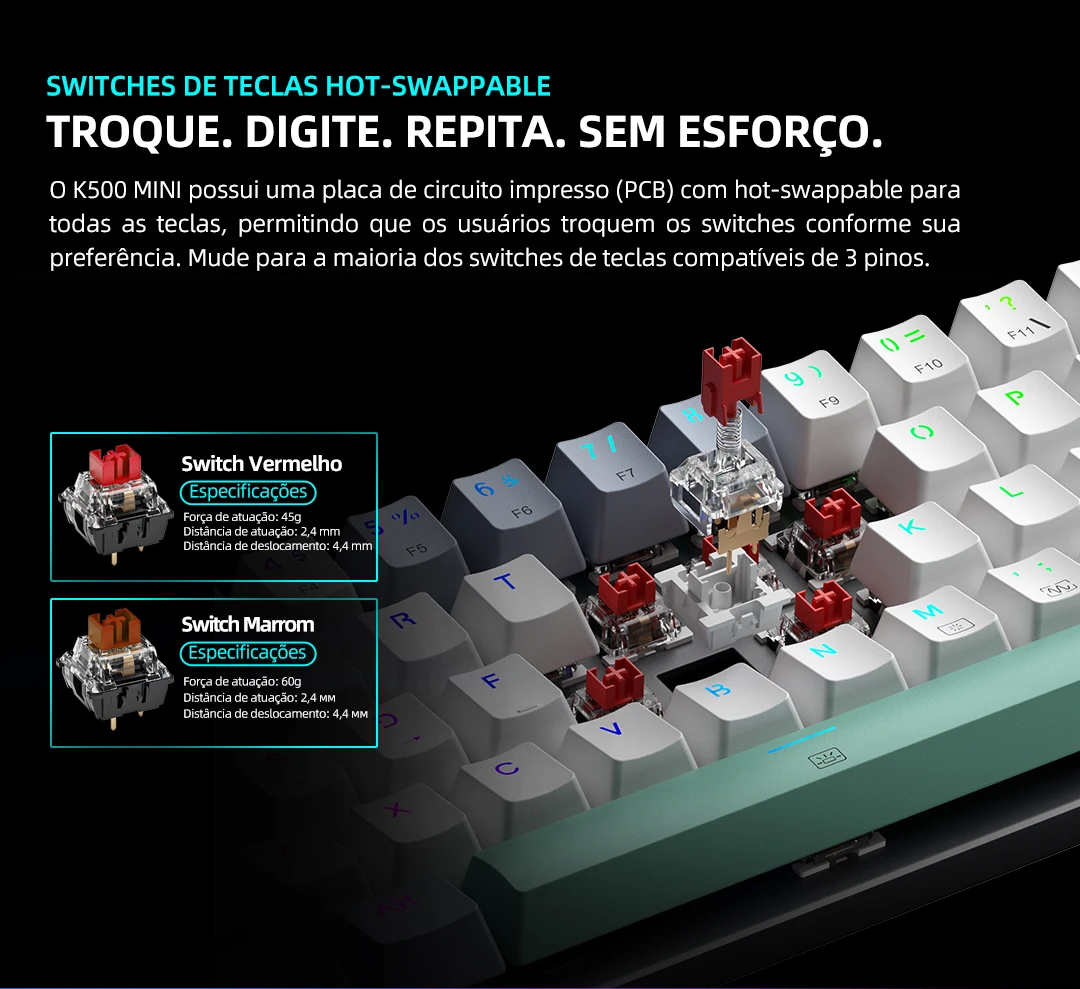
* Hot-swappable: quick replacement of 3-pin switches
* Connection: Wired USB-C
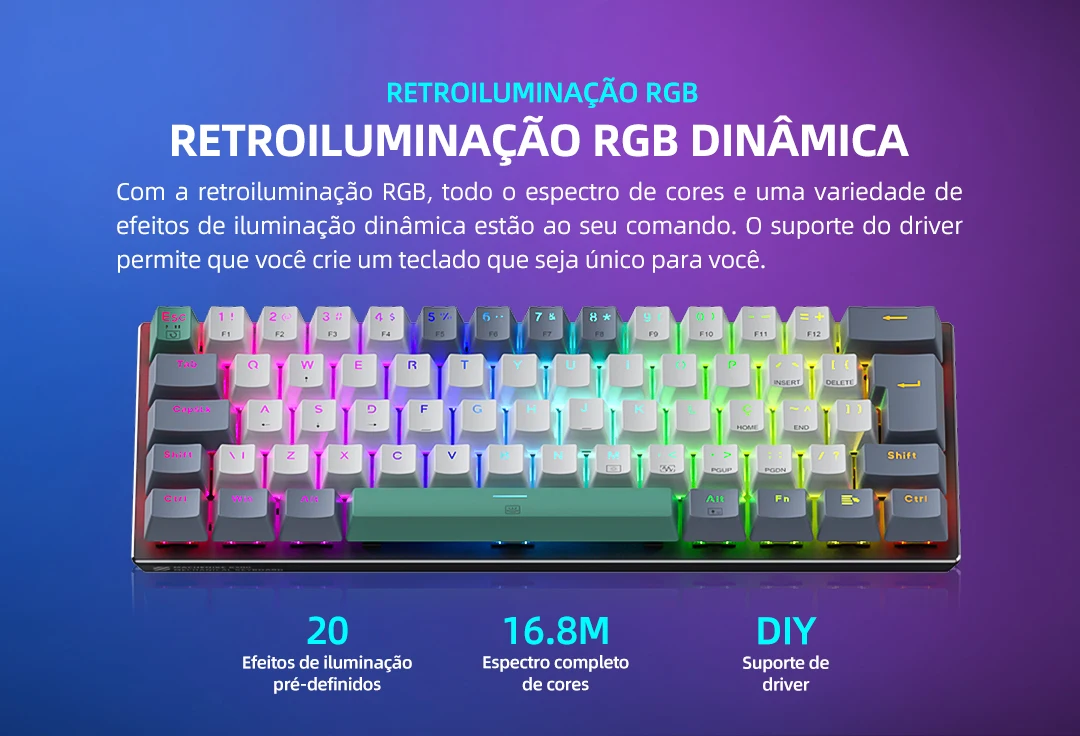
* Lighting: 16.8-million-color full RGB backlighting
* Switches: OUTEMU Blue/Red/Brown
* Size: 60% format
* Keycaps: laser-engraved ABS + PBT keycaps.
FEATURES
* Laser-engraved ABS+PBT keys, with secondary functions printed
* USB-C connection ensures seamless plug-and-play integration
* All keys can be quickly swapped with 3-pin switches
* Dynamic RGB backlighting
* 100% of keys with anti-ghosting and N-key rollover (no key lockouts).
* Aluminum top case. It delivers a premium feel, enhanced durability, improved stability, and a more satisfying sound compared to plastic alternatives.
PERFECT COMBINATION
Meet the K500-B61 MINI WIRED — compact enough for any space and versatile enough for every setup. Enjoy uninterrupted gaming with a 60% wired mini mechanical gaming keyboard that delivers the perfect balance between form and performance.

60% MINI FORMAT
60% compact format for an optimized gaming setup and more desk space for mouse movement.

HOT-SWAPPABLE KEYBOARD SWITCHES
The K500 MINI features a hot-swappable printed circuit board (PCB) for every key, allowing users to change switches according to their preferences. Compatible with most 3-pin key switches.
DYNAMIC RGB LIGHTING
With RGB backlighting, the full spectrum of colors and a variety of dynamic lighting effects are at your command. Driver support lets you create a keyboard that is truly your own.
ABNT2 LAYOUT
-LOCAL CUSTOMIZATION
To suit local habits, the K500 MINI has been specially designed with the ABNT2 layout, including several characters commonly used by users, to make the experience even smoother for Portuguese-speaking users.


Notice:
*MACHENIKE advocates environmental protection and a low-carbon consumer experience. Users who own this product are encouraged to comply with local laws and regulations regarding the recycling of waste electrical and electronic products when it is no longer needed, and to hand it over to local manufacturers with nationally recognized recycling qualifications for recycling and disposal, in order to reduce resource waste and protect the Earth’s natural environment.
*The image is for reference only. Please refer to the actual product for the final product standard.
*All data on this page comes from the Mechanics Lab, and the switch data comes from the brand’s official data. In the event of any discrepancy, the actual product shall prevail.
FAQS
1. Why is my mechanical keyboard not working?
A: This may be because the USB is not properly connected or the keyboard requires a driver installation. It may also sometimes be due to the operating system; for example, the keyboard may not be compatible with the operating system you are using.
2. There is a delay in my keyboard input. What should I do?
A: Delay is generally determined by the computer’s performance. If the computer’s performance is low and too many programs are running, it may cause delayed keyboard input. You can also check whether the keyboard’s USB connection is properly connected.
3. What is the difference between a wired mechanical keyboard and a wireless one?
A: The main difference is the connection method. Wired keyboards connect to the computer via a USB cable, while wireless keyboards connect via Bluetooth. Wired mechanical keyboards also usually offer faster response times with no delay, making them more suitable for gamers.
4. How do I clean my mechanical keyboard if it is difficult to clean?
A: You can purchase a dedicated keyboard cleaning tool, or clean it with a vacuum cleaner.
5. What should I do if some keys do not respond when pressed?
A: Try replacing the corresponding key switches. The package usually includes two extra replacement switches, so try replacing the switch first. If it still does not respond, please contact the relevant customer service team.
6. What should I do if most or all of the keys on the keyboard are not working?
A: Please contact the customer service team for the corresponding sales channel and ask them to provide a firmware update program. Follow the guide to update the PCB program.


